Dynamics AX Blog - Axapta 3.0 - Microsoft Dynamics AX (Axapta) - Seite 2

In den letzten Jahren, in denen ich mich fast hauptsächlich mit der Entwicklung im Umfeld von Microsoft Dynamics AX (vormals Axapta) beschäftigt habe, ist das eine oder andere Code-Fragment entstanden, von dem ich mir vorstellen könnte, daß es auch für andere AX-Entwickler ganz nützlich sein könnte. Aber auch Tips und Tricks zu dem mächtigen ERP-System werde ich in dieser Kategorie präsentieren.
RSS-Feed dieser KategorieRSS-Feed dieser Version
Text-Datei per X++ druckenEin kurzes Beispiel, wie man aus AX heraus via Notepad eine Text-Datei ausdrucken kann.
static void printTextFileFromAX(Args _args)
{
    WinAPI::shellExecute("c:\\windows\\system32\\NOTEPAD.EXE",  @'/pt "c:\temp\test.txt" "An OneNote 2010 senden"');
}
Hinweise: "An OneNote 2010 senden" ist dabei der Name des Druckers. Das Beispiel wurde in Dynamics AX 2012 verwendet, sollte allerdings auch in früheren Versionen verwendbar sein. |
Fehler beim Aufrufen des ActiveX-Controls NETRONIC VARCHART XGantt in Dynamics AX
09.10.2010Microsoft Dynamics AX (Axapta)
Ich habe mich schon seit längerem über zahlreiche Fehlermeldungen gewundert, die immer dann aufgetreten sind, wenn ich ein Formular geöffnet habe wo das ActiveX-Control NETRONIC VARCHART XGantt eingebettet war, z.B. das Formular Simultanplanungslauf. Folgende Fehlermeldungen hatte ich da am Bildschirm: ActXBaseControl::Open failure Eigentlich ist die Lösung ganz einfach! Ich arbeite natürlich auf einer Entwickler-Maschine, wo unterschiedlichste Versionen von Dynamcs AX/Axapta parallel installiert sind. Und die zuerst installierte und somit älteste Version bestimmt die aktuell verwendete Version der ActiveX-Komponente. Also ist folgendes zu tun: Deinstallieren der "veralteten" Version und installieren bzw. registrieren einer neueren Version z.B. über die Kommandozeile. REM Uninstall old version
|
Zugriff auf die Zwischenablage per X++
26.03.2010Microsoft Dynamics AX (Axapta)
In Dynamics AX kann man selbstverständlich auch auf die Zwischenablage zugreifen, ein kurzes Codebeispiel dazu im folgenden. Funktioniert übrigens zumindest seit Axpata 2.5. static void useClipboard(Args _args) { textBuffer textBuffer = new textBuffer(); ; // Write to clipboard textBuffer.appendText('Hello world!'); textBuffer.toClipboard(); // Read from clipboard textBuffer.fromClipboard(); info(textBuffer.getText()); } |
Notizen zur RecId
04.03.2010Microsoft Dynamics AX (Axapta)
Die RecId ist die mehr oder weniger eindeutige Kennung eines Datensatzes in Dynamics AX. Mehr oder weniger deshalb, weil es auf die verwendete Version von Dynamics AX bzw. Axapta ankommt:
| ||||||||||
Eintrag "Einstellungen" im Kontextmenü freischalten
04.02.2010Microsoft Dynamics AX (Axapta)
Wie man diesen Eintrag über die Berechtigungsverwaltung von Dynamics AX entfernt oder hinzufügt, wusste ich allerdings bis dato nicht. Erst ein Request beim Hersteller, den ein Kollege abgesetzt hat, hat mich auf die richtige Spur gebracht: Unter Sicherheit / Verwaltung / Sonstiges / Fomular "Personalisierung" muss man die Berechtigung auf mindestens "Bearbeiten" setzen, damit der Eintrag im Kontextmenü aufscheint. Und jetzt erklär mir mal einer, wie man das selbst finden soll... |
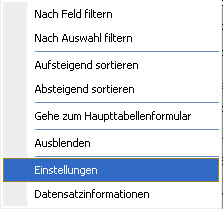 Jeder Entwickler kennt ihn und die meisten benutzen ihn auch regelmässig: Den Eintrag "Einstellungen" im Kontextmenü eines Formulares.
Was man bei Base Enums beachten sollte
21.12.2009Microsoft Dynamics AX (Axapta)
Schon einmal einen Base Enum in Dynamics AX erstellt? Oder einen bestehenden erweitert? Ja?! Dabei auch auf das folgende geachtet? .) Das erste Element eines Base Enums sollte den Wert 0 aufweisen und dieser sollte "Undefiniert", "Kein", "Unbekannt" oder ähnlichem entsprechen. Vor allem wenn man den Base Enum später in Tabellen verwenden möchte, die bereits Daten enthalten. |
|
|
|
|
|
|
|
Im folgenden ein Beispiel, wie man bei einer FormDataSource einen QueryBuildRange aufbaut, welcher nur tagesaktuelle Datensätze anzeigt.
Im Beispiel enthält unsere FormDataSource namens DataSourceName zwei Datumsfelder namens FromDate und ToDate und es sollen abhängig von einer Checkbox nur Datensätze angezeigt werden, die "heute" gültig sind.
{
queryBuildRange qbr;
qbr = sysQuery::findOrCreateRange(DataSourceName_ds.queryBuildDataSource(), fieldNum(DataSourceName, recId));
if( !ShowExpiredCheckBox.checked())
{
qbr.value(strfmt('('+
'((%5.%2 <= %1) && (%5.%3 >= %1)) || ' +
'((%5.%2 == %4) && (%5.%3 == %4)) || ' +
'((%5.%2 <= %1) && (%5.%3 == %4)) || ' +
'((%5.%3 >= %1) && (%5.%2 == %4)) ' +
')',
Date2StrXpp(systemDateGet()),
fieldstr(DataSourceName, FromDate),
fieldstr(DataSourceName, ToDate),
Date2StrXpp(dateNull()),
tableId2name(tableNum(DataSourceName))));
}
else
{
qbr.value(SysQuery::valueUnlimited());
}
}
Der Aufruf obiger Methode kann beispielsweise in der executeQuery() der Datasource erfolgen.