<?xml version="1.0" encoding="utf-8"?><?xml-stylesheet type="text/css" href="https://www.schweda.net/style_feed.css" ?>


<feed version="0.3" xmlns="http://www.w3.org/2005/Atom" xml:lang="de">
  <title>Blog von Heinz Schweda</title>
    <link rel="alternate" type="text/html" hreflang="de" href="https://www.schweda.net/" />
 <link rel="self" type="application/atom+xml" 
   href="https://www.schweda.net/blog_atom.php"/>
  <rights>Copyright (c) 2006, Heinz Schweda</rights>

  <updated>2006-08-01T12:00:00Z</updated>
  <author>
    <name>Heinz Schweda</name>
  </author>
<id>tag:schweda.net,2006:1</id>


    <entry>
<id>tag:schweda.net,2023-01-25:id707</id><title type="text">SysOperation-Framework: Finanzdimension als Parameter anbieten</title>
<author><name>Heinz Schweda</name></author>
<content type="html"><![CDATA[
<p>Um in einer Funktion, die &uuml;ber das SysOperation-Framework umgesetzt wurde, dem Benutzer einen Finanzdimensionswert einer bestimmten Dimension als Parameter anzubieten, kann man sich des folgenden Codes bedienen:
</p>


<h2>DataContract
</h2>


<pre class="pre_blog_axcode">
[
    DataContractAttribute
    ,SysOperationContractProcessingAttribute(classStr(SysOperationTemplateUIBuilder))
]
internal final class SysOperationTemplateDC implements SysOperationValidatable
{
    private DimensionValue myDimensionValue;

    [
        DataMember,
        SysOperationLabelAttribute(literalStr(&quot;@SYS105870&quot;)), 
        SysOperationDisplayOrderAttribute(&#39;3&#39;)
    ]
    public DimensionValue parmMyDimensionValue(DimensionValue _dimensionValue = myDimensionValue)
    {
        myDimensionValue = _dimensionValue;
        return myDimensionValue;
    }

}
</pre>


<h2>UI-Builder
</h2>


<pre class="pre_blog_axcode">
internal final class SysOperationTemplateUIBuilder extends SysOperationAutomaticUIBuilder
{
    private DialogField myDimensionValueField;

    public void postBuild()
    {
        super();

        myDimensionValueField= this.bindInfo().getDialogField(
            this.dataContractObject(), 
            methodStr(SysOperationTemplateDC, parmMyDimensionValue));

        if (myDimensionValueField)
        {
            myDimensionValueField.lookupButton(FormLookupButton::Always);
        }
    }

    public void postRun()
    {
        super();
    
        // register overrides for form control events
        myDimensionValueField.registerOverrideMethod(
            methodStr(FormStringControl, lookup), 
            methodStr(SysOperationTemplateUIBuilder, lookupMyDimension), 
            this);
    }

    public void lookupMyDimension(FormStringControl _dimensionValueControl)
    {
        Name dimensionAttributeName = &quot;CostCenter&quot;;

        if (_dimensionValueControl != null)
        {
            // Construct arguments for the custom lookup
            Args args = new Args();
            args.name(formStr(DimensionLookup));
            args.lookupValue(_dimensionValueControl.text());
            args.caller(_dimensionValueControl);

            DimensionAttribute dimensionAttribute = DimensionAttribute::findByLocalizedName(
                dimensionAttributeName, 
                false, 
                SystemParameters::find().SystemLanguageId);

            args.lookupField(dimensionAttribute.ValueAttribute);
            args.record(dimensionAttribute);

            // Do the lookup
            FormRun lookupFormRun = classFactory.formRunClass(args);
            lookupFormRun.init();

            _dimensionValueControl.performFormLookup(lookupFormRun);
        }
    }

}

</pre>


<p>&nbsp;
</p>]]></content>
<published>2023-01-25T13:38:00Z</published>
<updated>2023-01-25T13:38:00Z</updated>
<link href="https://www.schweda.net/blog_atom.php" rel="self" />
<link href="https://www.schweda.net/blog.php?bid=707"  rel="alternate" />
</entry>
<entry>
<id>tag:schweda.net,2022-02-16:id706</id><title type="text">&quot;OpenPrinter&quot;-Fehler beim Anzeigen eines Berichtes am Bildschirm</title>
<author><name>Heinz Schweda</name></author>
<content type="html"><![CDATA[
<p>Wenn beim Anzeigen eines Berichtes am Bildschirm folgender Fehler auftritt, muss man im Windows einen Standarddrucker einrichten.
</p>


<blockquote>

<p>OpenPrinter_1: rc:0 LastError:3012(0xbc4) Es wurden keine Drucker gefunden.
</p>

</blockquote>


<p>&nbsp;
</p>]]></content>
<published>2022-02-16T10:58:45Z</published>
<updated>2022-02-16T10:58:45Z</updated>
<link href="https://www.schweda.net/blog_atom.php" rel="self" />
<link href="https://www.schweda.net/blog.php?bid=706"  rel="alternate" />
</entry>
<entry>
<id>tag:schweda.net,2021-04-22:id705</id><title type="text">Unit-Tests per Powershell ausf&uuml;hren</title>
<author><name>Heinz Schweda</name></author>
<content type="html"><![CDATA[
<p>Um auf einer Entwicklungsumgebung Unit-Tests per Powershell auszuf&uuml;hren, kann man die SysTestConsole.exe nutzen:
</p>


<pre class="pre_blog_axcode">
.&#092;SysTestConsole.exe /test:NameOfTestClass1,NameOfTestClass2 /database:axdb

</pre>


<p><a href="https://www.schweda.net/pictures/blogpics/d365_systestconsole1.jpg" rel="lightbox" target="_blank"><img alt="SysTestConsole" height="82" src="https://www.schweda.net/pictures/blogpics/d365_systestconsole1.jpg" style="border-style:solid; border-width:0px" title="SysTestConsole" width="1003" /></a>
</p>]]></content>
<published>2021-04-22T08:14:00Z</published>
<updated>2021-04-22T08:14:00Z</updated>
<link href="https://www.schweda.net/blog_atom.php" rel="self" />
<link href="https://www.schweda.net/blog.php?bid=705"  rel="alternate" />
</entry>
<entry>
<id>tag:schweda.net,2020-09-30:id704</id><title type="text">Microsoft Dynamics 365 - Translation Service</title>
<author><name>Heinz Schweda</name></author>
<content type="html"><![CDATA[
<p>Kennt ihr das&nbsp;Microsoft Dynamics 365 - Translation Service in LCS?
</p>


<p>Damit kann man Labelfiles voll automatisiert &uuml;bersetzen lassen - sehr cool!
</p>


<p>Details dazu sind <a href="https://docs.microsoft.com/en-us/dynamics365/fin-ops-core/dev-itpro/lifecycle-services/use-translation-service" target="_blank" title="Translation Service">hier</a> zu finden.
</p>]]></content>
<published>2020-09-30T11:57:00Z</published>
<updated>2020-09-30T11:57:00Z</updated>
<link href="https://www.schweda.net/blog_atom.php" rel="self" />
<link href="https://www.schweda.net/blog.php?bid=704"  rel="alternate" />
</entry>
<entry>
<id>tag:schweda.net,2020-06-04:id702</id><title type="text">&quot;Cannot create a file when that file already exists&quot; beim Datenupgrade von AX 2012 auf Dynamics 365 for Finance and Operations</title>
<author><name>Heinz Schweda</name></author>
<content type="html"><![CDATA[
<p>Beim <strong>Datenupgrade</strong> eines AX 2012 R2 auf <strong>Dynamics 365 for Finance and Operations</strong> hatte ich beim Ausf&uuml;hren des &quot;DataUpgrade-Packages&quot; bei Schritt 9 folgenden Fehler:
</p>


<blockquote>Error during AOS start: Cannot create a file when that file already exists.
</blockquote>


<p>In meinem Fall hat ein Neustarten der auf Azure gehosteten Umgebung und Neustarten des Schrittes geholfen.
</p>]]></content>
<published>2020-06-04T19:19:54Z</published>
<updated>2020-06-04T19:19:54Z</updated>
<link href="https://www.schweda.net/blog_atom.php" rel="self" />
<link href="https://www.schweda.net/blog.php?bid=702"  rel="alternate" />
</entry>
<entry>
<id>tag:schweda.net,2020-05-04:id684</id><title type="text">DuplicateKeyException in Tabelle LogisticsLocationRole beim Datenupgrade von AX 2012 auf Dynamics 365 for Finance and Operations</title>
<author><name>Heinz Schweda</name></author>
<content type="html"><![CDATA[
<p>Beim <strong>Datenupgrade</strong> eines AX 2012 R2 auf <strong>Dynamics 365 for Finance and Operations</strong> hatte ich beim Ausf&uuml;hren des &quot;DataUpgrade-Packages&quot; bei Schritt 8 folgende Fehler:
</p>


<blockquote>

<p>Infolog diagnostic message: &#39;Cannot create a record in Roles (LogisticsLocationRole). Role: F?hrendes Unternehmen, Head company. The record already exists.&#39; on category &#39;Error&#39;.&nbsp;<br />
Application configuration sync failed. &nbsp;&nbsp;
</p>

</blockquote>


<p>Bzw.
</p>


<blockquote>

<p>Infolog diagnostic message: &#39;Cannot create a record in Roles (LogisticsLocationRole). Role: Stabile Organisation, Stable organization. The record already exists.&#39; on category &#39;Error&#39;. 08/20/2019 14:52:12: Application configuration sync failed.
</p>

</blockquote>


<p>Ursache waren zwei Datens&auml;tze in der Tabelle <em>LogisticsLocationRole</em>, die in der Quellumgebung (AX 2012 R2) &uuml;ber den Hotfix KB4048614 erstellt wurden. Dieser Hotfix ist interessanterweise genau jener, den man vor einem Upgrade von AX 2012 R2 auf D365 einspielen soll.
</p>


<p>In meinem Szenario konnte ich &uuml;ber das nachstehende Statement die Datens&auml;tze l&ouml;schen, und den Schritt 8 erfolgreich neu starten.
</p>


<pre class="pre_blog_sqlcode">
delete from LOGISTICSLOCATIONROLE
where type = 104 or type = 105

</pre>


<p><a href="https://www.schweda.net/pictures/blogpics/d365_ax2012_upgrade_logisticslocationrole.png" rel="lightbox" target="_blank"><img alt="Tablebrowser LogisticsLocationRole" height="304" src="https://www.schweda.net/pictures/blogpics/d365_ax2012_upgrade_logisticslocationrole.png" style="border-style:solid; border-width:0px" title="Tablebrowser LogisticsLocationRole" width="769" /></a>
</p>]]></content>
<published>2020-05-04T19:20:41Z</published>
<updated>2020-05-04T19:20:41Z</updated>
<link href="https://www.schweda.net/blog_atom.php" rel="self" />
<link href="https://www.schweda.net/blog.php?bid=684"  rel="alternate" />
</entry>
<entry>
<id>tag:schweda.net,2020-04-27:id695</id><title type="text">Fehler &quot;The step failed&quot; beim Platformupdate 32 beim Synchronisieren der Datenbank</title>
<author><name>Heinz Schweda</name></author>
<content type="html"><![CDATA[
<p>Tritt w&auml;hrend eines Platform Updates eines lokalen VPCs folgender Fehler auf...
</p>


<blockquote>

<p>GlobalUpdate script for service model: AOSService on machine: D365Local<br />
Sync AX database<br />
The running command stopped because the preference variable &quot;ErrorActionPreference&quot; or common parameter is set to Stop: System.Management.Automation.RuntimeException: An exception of type System.Net.WebException occurred when making an http request to: http://127.0.0.1/ReportServer. Refer to the log file for more details.<br />
The step failed<br />
The step: 25 is in failed state, you can use rerunstep command to debug the step explicitly<br />
&nbsp; &nbsp;at Microsoft.Dynamics.AX.AXUpdateInstallerBase.RunbookExecutor.ExecuteRunbookStepList(RunbookData runbookData, String updatePackageFilePath, Boolean silent, String stepID, ExecuteStepMode executeStepMode, Boolean versionCheck, Parameters parameters)<br />
&nbsp; &nbsp;at Microsoft.Dynamics.AX.AXUpdateInstallerBase.AXUpdateInstallerBase.execute(String runbookID, Boolean silent, String updatePackageFilePath, IRunbookExecutor runbookExecutor, Boolean versionCheck, Parameters param)<br />
&nbsp; &nbsp;at Microsoft.Dynamics.AX.AXUpdateInstaller.Program.InstallUpdate(String[] args)<br />
&nbsp; &nbsp;at Microsoft.Dynamics.AX.AXUpdateInstaller.Program.Main(String[] args)
</p>

</blockquote>


<p>...kann es m&ouml;glicherweise helfen, die Reporting Services &uuml;ber den&nbsp;Reporting Services Configuration Manager for SQL Server 2016 manuell zu starten und danach den Updatevorgang beim betroffenen Schritt fortzusetzen.
</p>]]></content>
<published>2020-04-27T10:32:01Z</published>
<updated>2020-04-27T10:32:01Z</updated>
<link href="https://www.schweda.net/blog_atom.php" rel="self" />
<link href="https://www.schweda.net/blog.php?bid=695"  rel="alternate" />
</entry>
<entry>
<id>tag:schweda.net,2020-04-27:id530</id><title type="text">Kommissionierliste eines Verkaufsauftrages per Code erfassen</title>
<author><name>Heinz Schweda</name></author>
<content type="html"><![CDATA[
<div class="div_table_100_wo_border">

<div class="div_tablerow">

<div class="div_tablecolumn" style="padding-right:10px">

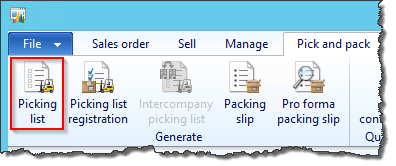
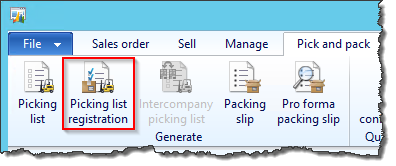
<p>Das nachstehende Code-Beispiel zeigt. wie man per Code eine Erfassung f&uuml;r eine Kommissionierliste buchen kann (in der Annahme da&szlig; beispielsweise alle notwendigen Informationen wie Entnahmelagerplatz usw. bereits eingetragen wurden).
</p>

</div>


<div class="div_tablecolumn" style="width:40%">

<p><a href="http://www.schweda.net/pictures/blogpics/ax2012_salespickinglist_register.png" rel="lightbox" target="_self"><img alt="Screenshot" height="166" src="http://www.schweda.net/pictures/blogpics/ax2012_salespickinglist_register.png" title="Screenshot" width="396" /></a>
</p>

</div>

</div>

</div>


<pre class="pre_blog_axcode">
static void pickingListRegistration(Args _args)
{
    WMSPickingRouteID pickingRouteID = &quot;00061&quot;;    // Route id to be picked
    List list = new List(Types::String);

    list.addEnd(pickingRouteID);

    WMSPickingRoute::finishMulti(list.pack());

    wmsDeliverPickedItems::checkDeliverPickedItems(pickingRouteID, list.pack());
}
</pre>


<p>&nbsp;
</p>]]></content>
<published>2020-04-27T10:30:25Z</published>
<updated>2020-04-27T10:30:25Z</updated>
<link href="https://www.schweda.net/blog_atom.php" rel="self" />
<link href="https://www.schweda.net/blog.php?bid=530"  rel="alternate" />
</entry>
<entry>
<id>tag:schweda.net,2020-04-27:id529</id><title type="text">Kommissionierliste f&uuml;r bestimmte Positionen eines Verkaufsauftrages erstellen</title>
<author><name>Heinz Schweda</name></author>
<content type="html"><![CDATA[
<div class="div_table_100_wo_border">

<div class="div_tablerow">

<div class="div_tablecolumn" style="padding-right:10px">

<p>Ich kenne keine M&ouml;glichkeit, wie man eine Kommissionierliste nur f&uuml;r bestimmte Auftragspositionen per Code erstellt.
</p>


<p>Deshalb nutze ich in dem folgenden Code-Beispiel folgenden Ansatz:
</p>


<p>Ich erstelle&nbsp;die Kommissionierliste mit Hilfe des SalesFormLetter-Frameworks und l&ouml;sche vor dem entscheidenden Schritt (dem Ausf&uuml;hren der run()-Methode) jene Eintr&auml;ge in der Tabelle SalesParmLine, die ich nicht ben&ouml;tigte.
</p>

</div>


<div class="div_tablecolumn" style="width:40%">

<p><a href="http://www.schweda.net/pictures/blogpics/ax2012_salespickinglist_create.png" rel="lightbox" target="_self"><img alt="Screenshot" height="166" src="http://www.schweda.net/pictures/blogpics/ax2012_salespickinglist_create.png" title="Screenshot" width="396" /></a>
</p>

</div>

</div>

</div>


<pre class="pre_blog_axcode">
static void createSalesPickingListSingleLine(Args _args)
{
    SalesTable salesTable = salesTable::find(&quot;001862&quot;); // Sales order
    container inventTransIdCon = [&quot;014015&quot;, &quot;014016&quot;];  // LOT-IDs to pick
    SalesFormLetter salesFormLetter;
    SalesParmLine salesParmLine;
    
    salesFormLetter = SalesFormLetter::construct(DocumentStatus::PickingList);

    // Do the steps manually, which normally are done in method
    // salesFormLetter.update()
    salesFormLetter.salesTable(salesTable);
    salesFormLetter.initParmSalesTable(salesFormLetter.salesTable());
    salesFormLetter.transDate(systemDateGet());
    salesFormLetter.specQty(SalesUpdate::All);
    salesFormLetter.proforma(salesFormLetter.salesParmUpdate().Proforma);
    salesFormLetter.printFormLetter(salesFormLetter.printFormLetter());
    salesFormLetter.printCODLabel(NoYes::No);
    salesFormLetter.printShippingLabel(NoYes::No);
    salesFormLetter.usePrintManagement(false);
    salesFormLetter.creditRemaining(salesFormLetter.creditRemaining());

    salesFormLetter.createParmUpdateFromParmUpdateRecord(
        SalesFormletterParmData::initSalesParmUpdateFormletter(
            salesFormLetter.documentStatus(),
            salesFormLetter.pack(),
            true,
            false,
            false));

    salesFormLetter.initParameters(
        salesFormLetter.salesParmUpdate(),
        Printout::Current);

    salesFormLetter.initLinesQuery();

    // Delete unwanted records in SalesParmLine
    while select forupdate salesParmLine
        where salesParmLine.ParmId == salesFormLetter.parmId()
    {
        if (conFind(inventTransIdCon, salesParmLine.InventTransId) == 0)
        {
            salesParmLine.delete();
        }
    }

    // Let&#39;s go
    salesFormLetter.run();
}
</pre>


<p>&nbsp;
</p>]]></content>
<published>2020-04-27T10:30:13Z</published>
<updated>2020-04-27T10:30:13Z</updated>
<link href="https://www.schweda.net/blog_atom.php" rel="self" />
<link href="https://www.schweda.net/blog.php?bid=529"  rel="alternate" />
</entry>
<entry>
<id>tag:schweda.net,2020-04-27:id528</id><title type="text">Kommissionierliste f&uuml;r alle Positionen eines Verkaufsauftrages erstellen</title>
<author><name>Heinz Schweda</name></author>
<content type="html"><![CDATA[
<div class="div_table_100_wo_border">

<div class="div_tablerow">

<div class="div_tablecolumn" style="padding-right:10px">

<p>Das nachstehende Code-Beispiel zeigt. wie man per Code eine Kommissionierliste f&uuml;r alle Positionen eines Verkaufsauftrages erstellen kann.
</p>

</div>


<div class="div_tablecolumn" style="width:40%">

<p><a href="http://www.schweda.net/pictures/blogpics/ax2012_salespickinglist_create.png" rel="lightbox" target="_self"><img alt="Screenshot" height="166" src="http://www.schweda.net/pictures/blogpics/ax2012_salespickinglist_create.png" title="Screenshot" width="396" /></a>
</p>

</div>

</div>

</div>


<pre class="pre_blog_axcode">
static void createSalesPickingList(Args _args)
{
    SalesTable salesTable = SalesTable::find(&quot;000752&quot;);
    SalesFormLetter salesFormLetter;

    salesFormLetter = SalesFormLetter::construct(DocumentStatus::PickingList);
    salesFormLetter.update(salesTable, systemDateGet(), SalesUpdate::All);
}
</pre>


<p>&nbsp;
</p>]]></content>
<published>2020-04-27T10:29:39Z</published>
<updated>2020-04-27T10:29:39Z</updated>
<link href="https://www.schweda.net/blog_atom.php" rel="self" />
<link href="https://www.schweda.net/blog.php?bid=528"  rel="alternate" />
</entry>
<entry>
<id>tag:schweda.net,2020-04-24:id682</id><title type="text">Zeile in einem Grid fett darstellen</title>
<author><name>Heinz Schweda</name></author>
<content type="html"><![CDATA[
<p>Um in einem Grid eine Zeile fett darzustellen kann man die Methode <strong>displayOption()</strong> der jeweiligen FormDataSource &uuml;berschreiben:
</p>


<pre class="pre_blog_axcode">
public void displayOption(Common _record, FormRowDisplayOption _options)
{
    MyTable myTable = _record as MyTable;
            
    super(_record, _options);
            
    _options.fontBold(false);
            
    if (<em>true</em>)  
    {
        _options.fontBold(true);
    }
}
</pre>]]></content>
<published>2020-04-24T11:24:00Z</published>
<updated>2020-04-24T11:24:00Z</updated>
<link href="https://www.schweda.net/blog_atom.php" rel="self" />
<link href="https://www.schweda.net/blog.php?bid=682"  rel="alternate" />
</entry>
<entry>
<id>tag:schweda.net,2020-04-16:id691</id><title type="text">Zugriff verweigert beim Aufruf eines SysOperationControllers</title>
<author><name>Heinz Schweda</name></author>
<content type="html"><![CDATA[
<p>Wenn beim Aufruf eines SysOperationControllers der nachstehende Fehler auftritt, kann eine m&ouml;gliche Ursache sein, da&szlig; am aufrufenden MenuItem die Eigenschaften <em>Enum Type Parameter, Enum Parameter</em> und <em>Parameters </em>nicht bef&uuml;llt sind.
</p>


<blockquote>

<p>Zugriff verweigert: SysOperationController
</p>

</blockquote>


<p>Ein MenuItem f&uuml;r einen SysOperationController sollte in der Regel wie folgt aussehen:
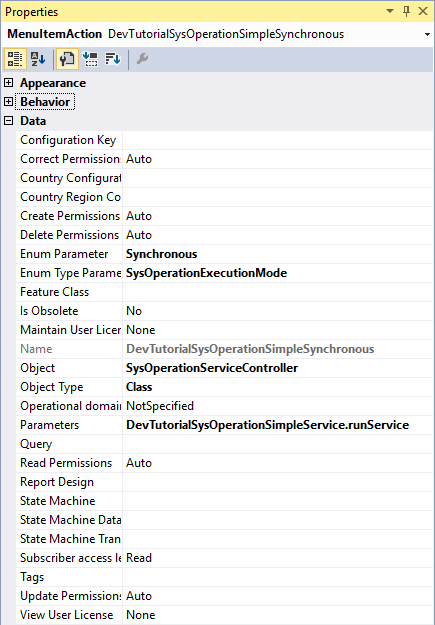
</p>


<p><a href="https://www.schweda.net/pictures/blogpics/d365_menuitemsysopsimplesync.png" rel="lightbox" target="_blank"><img alt="Screenshot MenuItem" height="625" src="https://www.schweda.net/pictures/blogpics/d365_menuitemsysopsimplesync.png" style="border-style:solid; border-width:0px" title="Screenshot MenuItem" width="435" /></a>
</p>]]></content>
<published>2020-04-16T08:43:15Z</published>
<updated>2020-04-16T08:43:15Z</updated>
<link href="https://www.schweda.net/blog_atom.php" rel="self" />
<link href="https://www.schweda.net/blog.php?bid=691"  rel="alternate" />
</entry>
<entry>
<id>tag:schweda.net,2020-04-08:id700</id><title type="text">Eingebaute Symbole als Display-Methode verwenden</title>
<author><name>Heinz Schweda</name></author>
<content type="html"><![CDATA[
<p>Wer eines der in Dynamics 365 for Finance and Operations eingebundenen Symbole als Display-Methode einbinden m&ouml;chte, der findet im folgenden ein Beispiel daf&uuml;r:
</p>


<pre class="pre_blog_axcode">
[SysClientCacheDataMethodAttribute(true)]
public display container displayOnHoldImage()
{
    if (trueContition)
    {
        return ImageReference::constructForSymbol(ImageReferenceSymbol::Pause).pack();
    }
    return connull();
}
</pre>


<p>&nbsp;
</p>]]></content>
<published>2020-04-08T09:50:16Z</published>
<updated>2020-04-08T09:50:16Z</updated>
<link href="https://www.schweda.net/blog_atom.php" rel="self" />
<link href="https://www.schweda.net/blog.php?bid=700"  rel="alternate" />
</entry>
<entry>
<id>tag:schweda.net,2020-03-29:id698</id><title type="text">Fehler &quot;The step failed&quot; beim Platformupdate 32 beim Aktualisieren des Retail self service</title>
<author><name>Heinz Schweda</name></author>
<content type="html"><![CDATA[
<p>Tritt w&auml;hrend eines Platform Updates eines lokalen VPCs folgender Fehler auf...
</p>


<blockquote>

<p>GlobalUpdate script for service model: RetailSelfService on machine: D365Local<br />
Update Retail self service.<br />
UpdateRetailSelfService.ps1 failed.<br />
The step failed<br />
The step: 52 is in failed state, you can use rerunstep command to debug the step explicitly<br />
&nbsp; &nbsp;at Microsoft.Dynamics.AX.AXUpdateInstallerBase.RunbookExecutor.ExecuteRunbookStepList(RunbookData runbookData, String updatePackageFilePath, Boolean silent, String stepID, ExecuteStepMode executeStepMode, Boolean versionCheck, Parameters parameters)<br />
&nbsp; &nbsp;at Microsoft.Dynamics.AX.AXUpdateInstaller.Program.InstallUpdate(String[] args)<br />
&nbsp; &nbsp;at Microsoft.Dynamics.AX.AXUpdateInstaller.Program.Main(String[] args)
</p>

</blockquote>


<p>...kann es m&ouml;glicherweise helfen, den Azure Storage Emulator&nbsp;zu starten und danach den Updatevorgang beim betroffenen Schritt fortzusetzen.
</p>]]></content>
<published>2020-03-29T15:29:58Z</published>
<updated>2020-03-29T15:29:58Z</updated>
<link href="https://www.schweda.net/blog_atom.php" rel="self" />
<link href="https://www.schweda.net/blog.php?bid=698"  rel="alternate" />
</entry>
<entry>
<id>tag:schweda.net,2020-03-28:id699</id><title type="text">Labelfile auf einer Entwicklungsumgebung entfernen</title>
<author><name>Heinz Schweda</name></author>
<content type="html"><![CDATA[
<p>Wenn man in die Verlegenheit kommen sollte, auf einer Entwicklungsumgebung ein Labelfile l&ouml;schen zu m&uuml;ssen, sollte man in jedem Fall anschlie&szlig;end pr&uuml;fen, ob in der folgenden Verzeichnissen noch Fragmente dieses Labelfiles &uuml;brig geblieben sind:
</p>


<ul>
	
<li>C:&#092;AOSService&#092;PackagesLocalDirectory&#092;MyModel&#092;MyModel&#092;AxLabelFile
</li>
	
<li>C:&#092;AOSService&#092;PackagesLocalDirectory&#092;MyModel&#092;Resources (inkl. Unterverzeichnisse je Sprache)
</li>

</ul>]]></content>
<published>2020-03-28T18:10:12Z</published>
<updated>2020-03-28T18:10:12Z</updated>
<link href="https://www.schweda.net/blog_atom.php" rel="self" />
<link href="https://www.schweda.net/blog.php?bid=699"  rel="alternate" />
</entry>
<entry>
<id>tag:schweda.net,2020-03-15:id675</id><title type="text">Einfache Zeitmessung im Code</title>
<author><name>Heinz Schweda</name></author>
<content type="html"><![CDATA[
<p>Um die Ausf&uuml;hrungsdauer einer Funktion/Logik zu messen, kann man&nbsp;System.Diagnostics.Stopwatch verwenden:
</p>


<pre class="pre_blog_axcode">
System.Diagnostics.Stopwatch watch = new System.Diagnostics.Stopwatch();
watch.Start();
// ... do something
watch.Stop();
info(strFmt(&quot;%1ms&quot;, watch.ElapsedMilliseconds));
</pre>]]></content>
<published>2020-03-15T18:03:48Z</published>
<updated>2020-03-15T18:03:48Z</updated>
<link href="https://www.schweda.net/blog_atom.php" rel="self" />
<link href="https://www.schweda.net/blog.php?bid=675"  rel="alternate" />
</entry>
<entry>
<id>tag:schweda.net,2020-03-15:id649</id><title type="text">Kommissionierliste f&uuml;r einzelne Positionen eines Verkaufauftrages erfassen</title>
<author><name>Heinz Schweda</name></author>
<content type="html"><![CDATA[
<div class="div_table_100_wo_border">

<div class="div_tablerow">

<div class="div_tablecolumn" style="padding-right:10px">

<p>Das nachstehende Code-Beispiel zeigt,&nbsp;wie man per Code eine Kommissionieriste erfassen kann und dabei nur Teilmengen verarbeitet.
</p>


<p>Dabei verfolge ich den Ansatz, f&uuml;r die ben&ouml;tigte Menge eine eigene Zeile in der Tabelle WMSOrderTrans zu erstellen (&uuml;ber die Teilen-Funktion) und die aktuell nicht ben&ouml;tigte Menge zu stornieren.
</p>

</div>


<div class="div_tablecolumn" style="width:40%">

<p><a href="http://www.schweda.net/pictures/blogpics/ax2012_salespickinglist_register.png" rel="lightbox" target="_self"><img alt="Screenshot" height="166" src="http://www.schweda.net/pictures/blogpics/ax2012_salespickinglist_register.png" title="Screenshot" width="396" /></a>
</p>

</div>

</div>

</div>


<pre class="pre_blog_axcode">
static void pickingListRegistrationPartly(Args _args)
{
    WMSPickingRouteID pickingRouteID = &quot;00066&quot;;    // Route id to be picked
    Map inventTransMap = new Map(Types::String, Types::Real);
    MapEnumerator me;
    InventTransId inventTransId;
    Qty pickQty;
    List list = new List(Types::String);
    WmsOrderTrans wmsOrderTrans;
    WmsOrderTrans wmsOrderTransNew;

    list.addEnd(pickingRouteID);

    // Build map containing the lot-ids and quantity to pick
    inventTransMap.insert(&quot;014023&quot;, 7);
    inventTransMap.insert(&quot;014026&quot;, 3);
    
    // Change quantity
    me = inventTransMap.getEnumerator();
    while (me.moveNext())
    {
        inventTransId = me.currentKey();    
        pickQty = me.currentValue();
        
        ttsBegin;
        select forupdate wmsOrderTrans
            where wmsOrderTrans.RouteId == pickingRouteID &amp;&amp;
                  wmsOrderTrans.inventTransId == inventTransId &amp;&amp;
                  wmsOrderTrans.FullPallet == NoYes::No &amp;&amp;
                 (wmsOrderTrans.ExpeditionStatus == WMSExpeditionStatus::Registered ||
                  wmsOrderTrans.ExpeditionStatus == WMSExpeditionStatus::Activated  ||
                  wmsOrderTrans.ExpeditionStatus == WMSExpeditionStatus::Started);        
        
        // Split line
        wmsOrderTransNew = wmsOrderTrans.split(pickQty);        
        ttsCommit;
        
        ttsBegin;
        // Cancel remaining line
        wmsOrderTrans.cancel();
        ttsCommit;
    }
    
    // Update
    WMSPickingRoute::finishMulti(list.pack()); 

    wmsDeliverPickedItems::checkDeliverPickedItems(pickingRouteID, list.pack());
}
</pre>]]></content>
<published>2020-03-15T18:02:45Z</published>
<updated>2020-03-15T18:02:45Z</updated>
<link href="https://www.schweda.net/blog_atom.php" rel="self" />
<link href="https://www.schweda.net/blog.php?bid=649"  rel="alternate" />
</entry>
<entry>
<id>tag:schweda.net,2020-03-05:id697</id><title type="text">[BPFrameworkFatalException]:A fatal exception occured in the Best Practices framework</title>
<author><name>Heinz Schweda</name></author>
<content type="html"><![CDATA[
<p>Ich hatte in der Vergangenheit immer wieder das Problem, da&szlig; die BP-Pr&uuml;fung nicht alle zu erwartetenden Abweichungen gefunden hat oder sogar der folgende Fehler ausgegeben wurde:
</p>


<blockquote>

<p>[BPFrameworkFatalException]:A fatal exception occured in the Best Practices framework.
</p>

</blockquote>


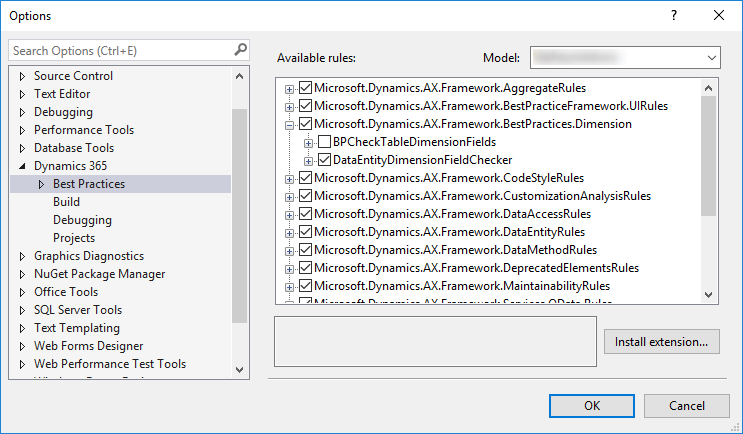
<p>In all diesen F&auml;llen hat es geholfen, die folgende Regel zu deaktivieren:&nbsp;<strong>BPCheckTableDimensionFields</strong>
</p>


<p><a href="https://www.schweda.net/pictures/blogpics/d365_bpdisablebpchecktabledimensionfields.png" rel="lightbox" target="_blank"><img alt="D365 Best practice rules" height="434" src="https://www.schweda.net/pictures/blogpics/d365_bpdisablebpchecktabledimensionfields.png" style="border-style:solid; border-width:0px" title="D365 Best practice rules" width="743" /></a>
</p>


<p>Gefunden habe ich den entscheidenden Tip in der <a href="https://community.dynamics.com/365/financeandoperations/f/dynamics-365-for-finance-and-operations-forum/308386/ax2012-vs-finops-bp-checks" target="_blank">Dynamics 365 Community</a>
</p>]]></content>
<published>2020-03-05T19:49:00Z</published>
<updated>2020-03-05T19:49:00Z</updated>
<link href="https://www.schweda.net/blog_atom.php" rel="self" />
<link href="https://www.schweda.net/blog.php?bid=697"  rel="alternate" />
</entry>
<entry>
<id>tag:schweda.net,2020-02-28:id693</id><title type="text">Dimensions-Anzeigewert auf Basis eines LedgerDimension-Feldes ermitteln</title>
<author><name>Heinz Schweda</name></author>
<content type="html"><![CDATA[
<p>Wenn man sich per Code den Anzeigewert einer als <em>RefRecId </em>gespeicherten Finanzdimension ermitteln m&ouml;chte, kann sich der nachstehenden Funktion aus der <strong>LedgerDimensionFacade </strong>bedienen:
</p>


<pre class="pre_blog_axcode">
DimensionDisplayValue displayValue = 
LedgerDimensionFacade::getDisplayValueForLedgerDimension(ledgerJournalTrans.LedgerDimension);
</pre>]]></content>
<published>2020-02-28T08:04:45Z</published>
<updated>2020-02-28T08:04:45Z</updated>
<link href="https://www.schweda.net/blog_atom.php" rel="self" />
<link href="https://www.schweda.net/blog.php?bid=693"  rel="alternate" />
</entry>
<entry>
<id>tag:schweda.net,2020-02-20:id696</id><title type="text">FormViewOption einer Form per Code steuern</title>
<author><name>Heinz Schweda</name></author>
<content type="html"><![CDATA[
<p>Um die FormViewOption einer&nbsp;Form zu steuern, kann man Code wie den folgenden verwenden:
</p>


<pre class="pre_blog_axcode">
public static void setFormViewOption(
    FormRun _formRun,
    FormViewOption _formViewOption = FormViewOption::Details
    )
{
    if (_formRun
        &amp;&amp; _formRun.viewOptionHelper())
    {
        _formRun.viewOptionHelper().setViewOption(_formViewOption);
    }
}
</pre>


<p>&nbsp;
</p>]]></content>
<published>2020-02-20T07:13:01Z</published>
<updated>2020-02-20T07:13:01Z</updated>
<link href="https://www.schweda.net/blog_atom.php" rel="self" />
<link href="https://www.schweda.net/blog.php?bid=696"  rel="alternate" />
</entry>
<entry>
<id>tag:schweda.net,2020-02-07:id667</id><title type="text">Kontextmen&uuml; des X++-Editors in Dynamics AX 2012 erweitern</title>
<author><name>Heinz Schweda</name></author>
<content type="html"><![CDATA[
<div class="div_table_100_wo_border">

<div class="div_tablerow">

<div class="div_tablecolumn" style="padding-right:10px">

<p>Voreinigen Jahren hatte ich schon mal einen <a href="https://www.schweda.net/blog_ax.php?bid=234" target="_self" title="Dynamics AX: Editorscript: Open Object in AOT">Beitrag</a> &uuml;ber die Klasse <strong>EditorScripts </strong>geschrieben. Das ist n&auml;mlich jene, mit deren Hilfe man die Funktionalit&auml;t des X++-Editors recht einfach erweitern kann.
</p>


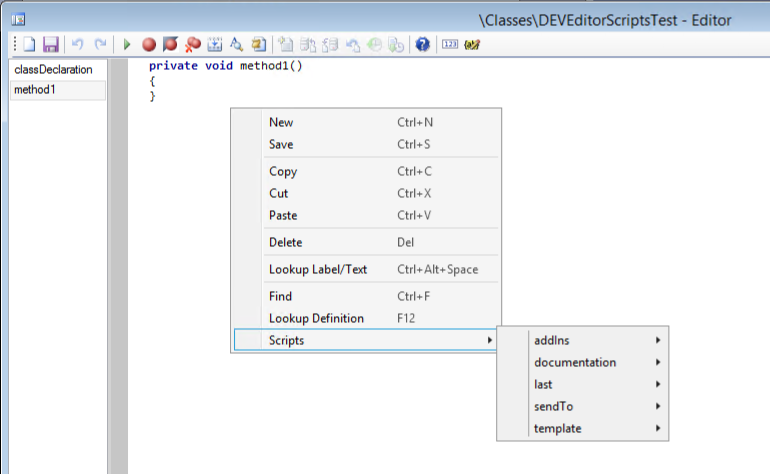
<p>Beispielsweise kann man das Kontextmen&uuml; des Editors einfach erweitern, in dem man in der Klasse Methoden erstellt.
</p>


<p>Diese Methoden m&uuml;ssen lediglich einige Kriterien erf&uuml;llen, das sind u.a.:
</p>


<ul>
	
<li>Der erste und einzige Parameter muss vom Typ Editor sein
</li>
	
<li>Die Methode muss public sein
</li>
	
<li>Die Methode darf nichts retournieren (void)
</li>

</ul>

</div>


<div class="div_tablecolumn" style="width:30%">

<p><a href="https://www.schweda.net/pictures/blogpics/ax2012_editorscripts_kontext.png" rel="lightbox" target="_blank"><img alt="X++-Editor" height="474" src="https://www.schweda.net/pictures/blogpics/ax2012_editorscripts_kontext.png" style="border-style:solid; border-width:0px" title="X++-Editor" width="770" /></a>
</p>

</div>

</div>

</div>


<p>Welche weitere Kriterien sie erf&uuml;llen muss, kann man in der Methode <em>EditorScripts.isApplicableMethod()</em> nachlesen.
</p>


<p>Sind diese Kriterien erf&uuml;llt, kann man &uuml;ber die Benennung der Methode sogar die Men&uuml;struktur steuern, dabei wird der Unterstrich &quot;_&quot; als Trennzeichen genutzt.
</p>


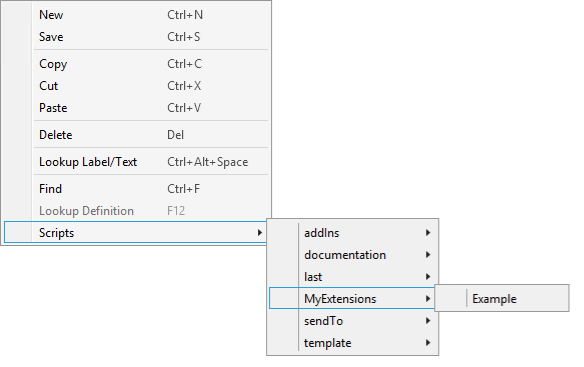
<p>Die folgende Methode w&uuml;rde beispielsweise ein Untermen&uuml; <em>MyExtensions </em>mit einem Eintrag <em>Example </em>erzeugen.
</p>


<pre class="pre_blog_axcode">
//AOSRunmode::Client
public void MyExtensions_Example(Editor _editor)
{
    //...do something...
}
</pre>


<p><a href="https://www.schweda.net/pictures/blogpics/ax2012_editorscripts_kontext_1.png" rel="lightbox" target="_blank"><img alt="X++-Editor Example" height="367" src="https://www.schweda.net/pictures/blogpics/ax2012_editorscripts_kontext_1.png" style="border-style:solid; border-width:0px" title="X++-Editor Example" width="584" /></a>
</p>


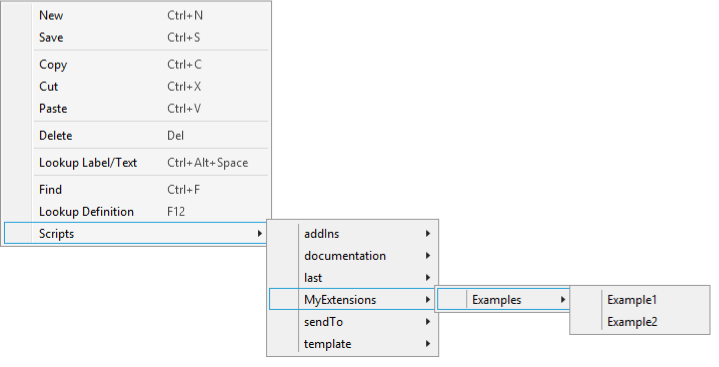
<p>Auch verschachtelte Untermen&uuml;s sind so m&ouml;glich:
</p>


<pre class="pre_blog_axcode">
//AOSRunmode::Client
public void MyExtensions_Examples_Example1(Editor _editor)
{
    //...do something...
}
</pre>


<p><a href="https://www.schweda.net/pictures/blogpics/ax2012_editorscripts_kontext_2.png" rel="lightbox" target="_blank"><img alt="X++-Editor Example" height="367" src="https://www.schweda.net/pictures/blogpics/ax2012_editorscripts_kontext_2.png" style="border-style:solid; border-width:0px" title="X++-Editor Example" width="719" /></a>
</p>


<p>Weiters wird durch die Benennung der Methode&nbsp; indirekt ein Schl&uuml;sselwort definiert, welches im Editor &auml;hnlich wie FOR, WHILE, SWITCH,&hellip; in Kombination mit der Tabulatortaste&nbsp; verwendet werden k&ouml;nnen.
</p>


<p>Das Schl&uuml;sselwort ist jenes, nach dem letzten _ des Methodennamen.<br />
Im folgenden Beispiel w&auml;re &quot;devVersion&quot; (Gross-/Kleinschreibung beachten) das Schl&uuml;sselwort.
</p>


<pre class="pre_blog_axcode">
public void template_method_devVersion(Editor _editor)
{
    // do something
}
</pre>


<p>&Uuml;ber die oben genannte Methode <em>EditorScripts.isApplicableMethod()</em> kann man &uuml;brigens auch steuern, wann eine Methode angeboten werden soll.
</p>]]></content>
<published>2020-02-07T07:40:53Z</published>
<updated>2020-02-07T07:40:53Z</updated>
<link href="https://www.schweda.net/blog_atom.php" rel="self" />
<link href="https://www.schweda.net/blog.php?bid=667"  rel="alternate" />
</entry>
<entry>
<id>tag:schweda.net,2020-01-18:id672</id><title type="text">Best-Practice-Abweichungen unterdr&uuml;cken</title>
<author><name>Heinz Schweda</name></author>
<content type="html"><![CDATA[
<p>Prinzipiell sollte jede L&ouml;sung in <strong>Dynamics 365 for Finance and Operations</strong> frei von Best-Practice-Abweichungen sein, dennoch gibt es ab und an die Notwendigkeit, sie unterdr&uuml;cken zu m&uuml;ssen.
</p>


<p>Ein solcher Fall sind beispielsweise Eventhandler, die ein vorgegebenes Paramterprofil aufweisen,&nbsp;im Falle eine Nicht-Verwendung eines dieser Parameter aber eine BP-Abweichung verursachen.
</p>


<pre class="pre_blog_axcode">
class MyFreeTextInvoiceHeaderFooterTmpEH
{
    [DataEventHandler(tableStr(FreeTextInvoiceHeaderFooterTmp), DataEventType::Inserting)]
    public static void FreeTextInvoiceHeaderFooterTmp_onInserting(Common sender, DataEventArgs e)
    {
        FreeTextInvoiceHeaderFooterTmp freeTextInvoiceHeaderFooterTmp;
    
        freeTextInvoiceHeaderFooterTmp = sender;
    
        if (freeTextInvoiceHeaderFooterTmp.CompanyBankAccount == &quot;&quot;)
        {
            freeTextInvoiceHeaderFooterTmp.CompanyBankName = &quot;Unknown&quot;;
        }
    }
}
</pre>


<p>Bei obigem EH w&uuml;rde folgende BP-Abweichung ausgegeben werden, da der Parameter <em>e</em> nicht verwendet wird:
</p>


<blockquote>

<p>BP Rule: [BPParameterNotUsed]:The parameter &#39;e&#39; is not used.
</p>

</blockquote>


<p>Um dies zu verhindern kann man im einfachsten Fall das Attribute <strong>SuppressBPWarning </strong>verwenden:
</p>


<pre class="pre_blog_axcode">
class MyFreeTextInvoiceHeaderFooterTmpEH
{
    [DataEventHandler(tableStr(FreeTextInvoiceHeaderFooterTmp), DataEventType::Inserting),
    SuppressBPWarning(&#39;BPParameterNotUsed&#39;, &#39;False positive&#39;)]
    public static void FreeTextInvoiceHeaderFooterTmp_onInserting(Common sender, DataEventArgs e)
    {
        FreeTextInvoiceHeaderFooterTmp freeTextInvoiceHeaderFooterTmp;
    
        freeTextInvoiceHeaderFooterTmp = sender;
    
        if (freeTextInvoiceHeaderFooterTmp.CompanyBankAccount == &quot;&quot;)
        {
            freeTextInvoiceHeaderFooterTmp.CompanyBankName = &quot;Unknown&quot;;
        }
    }
}
</pre>


<p>Es besteht aber auch die M&ouml;glichkeit, all diese Suppressions in einer modulgebundenen Datei zu sammeln. Dazu muss man im Verzeichnis des Modules eine XML-Datei wie folgt anlegen:
</p>


<p>K:&#092;AosService&#092;PackagesLocalDirectory&#092;<em>YourModel</em>&#092;<em>YourModel</em>&#092;<br />
AxIgnoreDiagnosticList&#092;<em>YourModel</em>_BPSuppressions.xml
</p>


<pre class="pre_blog_csharpcode">
&lt;?xml version=&quot;1.0&quot; encoding=&quot;utf-8&quot;?&gt;
&lt;IgnoreDiagnostics&gt;
  &lt;Name&gt;<em>YourModel</em>_BPSuppressions&lt;/Name&gt;
  &lt;Items&gt;
    &lt;Diagnostic&gt;
      &lt;DiagnosticType&gt;BestPractices&lt;/DiagnosticType&gt;
      &lt;Severity&gt;Warning&lt;/Severity&gt;
      &lt;Path&gt;dynamics://Class/MyFreeTextInvoiceHeaderFooterTmpEH/Method/FreeTextInvoiceHeaderFooterTmp_onInserting&lt;/Path&gt;
      &lt;Moniker&gt;BPParameterNotUsed&lt;/Moniker&gt;
      &lt;Justification&gt;Event handler parameters that cannot be removed from the method&amp;apos;s signature.&lt;/Justification&gt;
    &lt;/Diagnostic&gt;
  &lt;/Items&gt;
&lt;/IgnoreDiagnostics&gt;
</pre>


<p>Darauf achten, da&szlig; im XML der Name des Models den Gegebenheiten angepasst werden muss.
</p>


<p><em>DiagnosticType </em>ist immer &quot;BestPractices&quot;. <em>Severity</em>, <em>Path </em>und <em>Moniker </em>k&ouml;nnen meist aus der Fehlermeldung in der <em>Error list</em> von Visual Studio ausgelesen werden. Meiner Erfahrung nach aber leider nicht immer. In diesem Fall kann man auf dieser Seite nachlesen, ob man einen passenden Moniker findet:
</p>


<p><a href="https://docs.microsoft.com/en-us/dynamics365/unified-operations/dev-itpro/dev-tools/customization-analysis-report" target="_blank" title="Customization Analysis Report (CAR)">https://docs.microsoft.com/en-us/dynamics365/unified-operations/dev-itpro/dev-tools/customization-analysis-report</a>
</p>


<p>Mir selbst sind bislang die folgenden Monikers &uuml;ber den Weg gelaufen:
</p>


<ul>
	
<li>BPParameterNotUsed
</li>
	
<li>BPEmptyCompoundStatement
</li>
	
<li>BPErrorMethodUnbalancedTtsbeginCommit
</li>
	
<li>BPCheckParametersModified
</li>
	
<li>BPUpgradeCodeLateBoundCall
</li>
	
<li>BPErrorClassNewNotProtected
</li>

</ul>


<p>Sobald man eine solche XML-Datei angelegt hat, kann man das Kontextmen&uuml; des Projektes von Visual-Studio nutzen, um die Datei zu berarbeiten: <strong>Edit Best practice suppressions</strong>
</p>


<p>Man kann f&uuml;r diese XML-Datei &uuml;brigens im selben Verzeichnis ein XML-Schema ablegen, um den folgenden Fehler zu vermeiden:
</p>


<blockquote>

<p>Could not find schema information for the element &#39;IgnoreDiagnostics&#39;.
</p>

</blockquote>


<p>Ein solches Schema erstellt man &uuml;ber Visual-Studio unter <em>XML &gt; Create schema</em> (dieses Men&uuml; ist nur verf&uuml;gbar, wenn man grade eine XML-Datei ge&ouml;ffnet hat).&nbsp;
</p>


<p>Um die XML-Datei (und ggf.&nbsp;das Schema) zur Versionskontrolle hinzuzuf&uuml;gen, muss man &uuml;ber den&nbsp;Source Control Explorer in das Verzeichnis des entsprechenden Models wechseln und &uuml;ber <em>Add Items to Folder</em> die Dateien ausw&auml;hlen.
</p>


<p>&Uuml;brigens hab ich die Erfahrung gemacht, da&szlig; man die XML-Datei ausserhalb von Visual-Studio bearbeiten sollte.
</p>]]></content>
<published>2020-01-18T11:10:42Z</published>
<updated>2020-01-18T11:10:42Z</updated>
<link href="https://www.schweda.net/blog_atom.php" rel="self" />
<link href="https://www.schweda.net/blog.php?bid=672"  rel="alternate" />
</entry>
<entry>
<id>tag:schweda.net,2020-01-17:id673</id><title type="text">Exception beim Platformupdate 30</title>
<author><name>Heinz Schweda</name></author>
<content type="html"><![CDATA[
<p>Als ich vor kurzem eine lokales D365-VPC mit dem Platform Update 30 versorgen wollte, trat bei Step 19&nbsp;der folgende Fehler auf:
</p>


<blockquote>

<p>GlobalUpdate script for service model: AOSService on machine: D365Local<br />
Sync AX database<br />
The running command stopped because the preference variable &quot;ErrorActionPreference&quot; or common parameter is set to Stop: System.Management.Automation.RuntimeException: An exception of type System.Net.WebException occurred when making an http request to: http://127.0.0.1/ReportServer. Refer to the log file for more details.<br />
The step failed
</p>

</blockquote>


<p>Die Ursache f&uuml;r diesen Fehler war rasch gefunden - nach dem Download des VPC aus LCS wurde der Name des virtuellen Computers ge&auml;ndert, dieser aber nicht &uuml;berall nachgezogen. Dadurch hatten die SQL Reporting&nbsp;Services ein Problem, hier musste eine neue Database eingetragen werden. Wie dies geht, und was man noch alles beim Umbenennen eines VPCs ber&uuml;cksichtigen muss steht &uuml;brigens <a href="https://docs.microsoft.com/en-us/dynamics365/fin-ops-core/dev-itpro/migration-upgrade/vso-machine-renaming" target="_blank" title="Rename a local development (VHD) environment">hier</a>.
</p>]]></content>
<published>2020-01-17T08:05:32Z</published>
<updated>2020-01-17T08:05:32Z</updated>
<link href="https://www.schweda.net/blog_atom.php" rel="self" />
<link href="https://www.schweda.net/blog.php?bid=673"  rel="alternate" />
</entry>
<entry>
<id>tag:schweda.net,2020-01-15:id679</id><title type="text">Fehler &quot;The step failed&quot; beim Platformupdate 30 in Verbindung mit Reporting services</title>
<author><name>Heinz Schweda</name></author>
<content type="html"><![CDATA[
<p>Tritt w&auml;hrend eines Platform Updates eines lokalen VPCs folgender Fehler auf...
</p>


<blockquote>

<p>Executing step: 19<br />
GlobalUpdate script for service model: AOSService on machine: D365FOSHLocal<br />
Sync AX database<br />
The running command stopped because the preference variable &quot;ErrorActionPreference&quot; or common parameter is set to Stop: System.Management.Automation.RuntimeException: An exception of type System.Net.WebException occurred when making an http request to: http://127.0.0.1/ReportServer. Refer to the log file for more details.<br />
The step failed<br />
The step: 19 is in failed state, you can use rerunstep command to debug the step explicitly<br />
&nbsp; &nbsp;at Microsoft.Dynamics.AX.AXUpdateInstallerBase.RunbookExecutor.ExecuteRunbookStepList(RunbookData runbookData, String updatePackageFilePath, Boolean silent, String stepID, ExecuteStepMode executeStepMode, Boolean versionCheck, Parameters parameters)<br />
&nbsp; &nbsp;at Microsoft.Dynamics.AX.AXUpdateInstallerBase.AXUpdateInstallerBase.execute(String runbookID, Boolean silent, String updatePackageFilePath, IRunbookExecutor runbookExecutor, Boolean versionCheck, Parameters param)<br />
&nbsp; &nbsp;at Microsoft.Dynamics.AX.AXUpdateInstaller.Program.InstallUpdate(String[] args)<br />
&nbsp; &nbsp;at Microsoft.Dynamics.AX.AXUpdateInstaller.Program.Main(String[] args)
</p>

</blockquote>


<p>...kann die Ursache sein, da&szlig; der Computername des VPCs ge&auml;ndert wurde, und dabei aber nicht alle von Microsoft empfohlenen Schritte durchgef&uuml;hrt wurden.
</p>


<p>Welche das sind, ist hier zu finden:&nbsp;<a href="https://docs.microsoft.com/en-us/dynamics365/fin-ops-core/dev-itpro/migration-upgrade/vso-machine-renaming" target="_blank" title="docs.microsoft.com">https://docs.microsoft.com/en-us/dynamics365/fin-ops-core/dev-itpro/migration-upgrade/vso-machine-renaming</a>
</p>


<p>&nbsp;
</p>


<p>&nbsp;
</p>]]></content>
<published>2020-01-15T07:21:44Z</published>
<updated>2020-01-15T07:21:44Z</updated>
<link href="https://www.schweda.net/blog_atom.php" rel="self" />
<link href="https://www.schweda.net/blog.php?bid=679"  rel="alternate" />
</entry>
<entry>
<id>tag:schweda.net,2020-01-03:id685</id><title type="text">Finanzdimension als Display-Methode anzeigen</title>
<author><name>Heinz Schweda</name></author>
<content type="html"><![CDATA[
<pre class="pre_blog_axcode">
[SysClientCacheDataMethodAttribute(true)]
public display DimensionDisplayValue displayLedgerDimensionValue()
{
    return LedgerDimensionFacade::getDisplayValueForLedgerDimension(this.LedgerDimension);
}
</pre>]]></content>
<published>2020-01-03T15:52:54Z</published>
<updated>2020-01-03T15:52:54Z</updated>
<link href="https://www.schweda.net/blog_atom.php" rel="self" />
<link href="https://www.schweda.net/blog.php?bid=685"  rel="alternate" />
</entry>

</feed>